HTTP/3 采用 QUIC 作为底层传输协议,替代了传统 TCP。QUIC 构建在 UDP 之上,整合了传输层和加密层,支持多路复用、零往返时间(0-RTT)连接建立,以及内置的端到端加密。这使得 HTTP/3 在移动网络和高延迟环境中表现更优,同时保持了 HTTP 的无状态性和请求-响应模型。
HTTP/2(2015 年标准化)虽引入了多路复用和头部压缩等优化,但仍依赖 TCP,存在性能瓶颈。
本文介绍了如何部署一个支持http3的服务器
2025年8月 ubuntu24中,默认安装的nginx版本是1.24.0。
但是nginx1.25开始才支持http3/quic,所以要使用http3有两种方式:
apt search nginx
# nginx/noble-updates 1.24.0-2ubuntu7.4 amd64
#  small, powerful, scalable web/proxy server
nginx1.25开始支持 quic
https://quic.nginx.org/
The code previously developed in a separate “quic” branch was merged to the nginx mainline and it is a part of nginx since 1.25.0 release.
方式一
拉代码编译,参考:https://nginx.org/en/docs/quic.html
方式二
从参考资料2中,得知,可以通过:
添加Nginx官方的APT仓库,以便可以从Nginx官方直接安装Nginx软件包(特别是mainline版本)。首先安装必要的工具,然后下载并导入Nginx的签名密钥,最后添加仓库地址到APT源列表中。这样,之后就可以通过 apt install nginx 来安装或更新Nginx了。此流程添加的是 Nginx Mainline 分支(最新功能,但未经完整测试)。若需要稳定版,可将 URL 中的 mainline 替换为 stable。
操作如下:
sudo apt update
sudo apt install curl gnupg2 ca-certificates lsb-release ubuntu-keyring
curl https://nginx.org/keys/nginx_signing.key | gpg --dearmor | sudo tee /usr/share/keyrings/nginx-archive-keyring.gpg >/dev/null
echo "deb [signed-by=/usr/share/keyrings/nginx-archive-keyring.gpg] http://nginx.org/packages/mainline/ubuntu `lsb_release -cs` nginx" | sudo tee /etc/apt/sources.list.d/nginx.list
sudo apt update
sudo apt install nginx
检查nginx是否支持http3
nginx -V 2>&1 | grep -E 'http_v3_module|http3'
支持http3需要增加配置
主要有2个配置,listen 443 quic reuseport; 和 add_header Alt-Svc 'h3=":443"; ma=86400';
前者是监听udp端口,后者是支持从http2升级到http3,详细配置如下。
server {
# 监听 UDP (QUIC+HTTP/3)
listen 443 quic reuseport;
# Enable HTTP/3
# h3: HTTP/3 标识 | 443: 端口 | ma: 有效期(秒)
add_header Alt-Svc 'h3=":443"; ma=86400';
# 原有配置
# -------
listen 443 ssl; # 监听 TCP (HTTP/1.1/HTTP/2)
server_name your_domain.com;
# SSL 证书配置
ssl_certificate /path/to/fullchain.pem;
ssl_certificate_key /path/to/privkey.pem;
ssl_protocols TLSv1.3; # HTTP/3 强制要求 TLS 1.3
# ...
# -------
}
配置后检查配置有效,并且重启nginx
!!!强烈建议先执行下 sudo nginx -t , 可以快速检查是不是配置有问题,而不会影响nginx服务。
# 检查配置是否有效
sudo nginx -t
sudo systemctl stop nginx
sudo systemctl start nginx
sudo systemctl reload nginx
部署中遇到的问题
- 更新之后,原有的
/etc/nginx/sites-available/default 配置没有生效
检查 /etc/nginx/nginx.conf 这个文件,添加如下一行:
include /etc/nginx/sites-available/default;
/etc/nginx/nginx.conf 完整配置:
user  nginx;
worker_processes  auto;
error_log  /var/log/nginx/error.log notice;
pid        /run/nginx.pid;
events {
    worker_connections  1024;
}
http {
    include       /etc/nginx/mime.types;
    default_type  application/octet-stream;
    log_format  main  '$remote_addr - $remote_user [$time_local] "$request" '
                      '$status $body_bytes_sent "$http_referer" '
                      '"$http_user_agent" "$http_x_forwarded_for"';
    access_log  /var/log/nginx/access.log  main;
    sendfile        on;
    #tcp_nopush     on;
    keepalive_timeout  65;
    #gzip  on;
    include /etc/nginx/conf.d/*.conf;
    include /etc/nginx/sites-available/default;
}
- 更新之后,会有报错:
报错1:
2532228: nginx: emerg unknown directive “ssl” in /etc/nginx/sites-available/default:23
报错2:
nginx: [emerg] invalid parameter “http3” in /etc/nginx/sites-available/default:22
原因是
- 新版本的nginx不支持了ssl on,注释掉就好。
- 新版本的nginx启动的配置是quic (
listen 443 quic reuseport; ),而不是http3 (listen 443 http3 reuseport;)参考1的配置说明
验证有效
curl 验证
docker run -ti --rm alpine/curl-http3 curl --http3 -sI https://lezeya.com
$ docker run -ti --rm alpine/curl-http3 curl --http3 -sI https://lezeya.com
HTTP/3 200
server: nginx/1.29.1
date: Tue, 19 Aug 2025 01:12:43 GMT
content-type: text/html
content-length: 15235
last-modified: Sat, 22 Mar 2025 14:15:57 GMT
etag: "67dec61d-3b83"
alt-svc: h3=":443"; ma=86400
accept-ranges: bytes
$ docker run -ti --rm alpine/curl-http3 curl --http3 -sI https://www.baidu.com
HTTP/1.1 200 OK
Accept-Ranges: bytes
Cache-Control: private, no-cache, no-store, proxy-revalidate, no-transform
Connection: keep-alive
Content-Length: 277
Content-Type: text/html
Date: Tue, 19 Aug 2025 01:14:21 GMT
Etag: "575e1f60-115"
Last-Modified: Mon, 13 Jun 2016 02:50:08 GMT
Pragma: no-cache
Server: bfe/1.0.8.18
$ docker run -ti --rm alpine/curl-http3 curl --http3 -v https://lezeya.com/api/echo
* Host lezeya.com:443 was resolved.
* IPv6: (none)
* IPv4: 43.153.152.252
* Trying 43.153.152.252:443...
* CAfile: /etc/ssl/certs/ca-certificates.crt
* CApath: /etc/ssl/certs
* Server certificate:
* subject: CN=lezeya.com
* start date: Jul 19 00:00:00 2025 GMT
* expire date: Oct 16 23:59:59 2025 GMT
* subjectAltName: host "lezeya.com" matched cert's "lezeya.com"
* issuer: C=CN; O=TrustAsia Technologies, Inc.; CN=TrustAsia DV TLS RSA CA 2025
* SSL certificate verify ok.
* Connected to lezeya.com (43.153.152.252) port 443
* using HTTP/3
* [HTTP/3] [0] OPENED stream for https://lezeya.com/api/echo
* [HTTP/3] [0] [:method: GET]
* [HTTP/3] [0] [:scheme: https]
* [HTTP/3] [0] [:authority: lezeya.com]
* [HTTP/3] [0] [:path: /api/echo]
* [HTTP/3] [0] [user-agent: curl/8.11.0-DEV]
* [HTTP/3] [0] [accept: */*]
> GET /api/echo HTTP/3
> Host: lezeya.com
> User-Agent: curl/8.11.0-DEV
> Accept: */*
>
* Request completely sent off
< HTTP/3 200
< server: nginx/1.29.1
< date: Tue, 19 Aug 2025 01:18:03 GMT
< content-type: application/json
< content-length: 291
< access-control-allow-origin: *
< access-control-allow-methods: GET, POST, PUT, DELETE, OPTIONS
< access-control-allow-headers: Origin, Accept, Content-Type, X-Requested-With, X-CSRF-Token
< alt-svc: h3=":443"; ma=86400
< access-control-allow-origin: *
<
* Connection #0 to host lezeya.com left intact
$ docker run -ti --rm alpine/curl-http3 curl --http3 -v https://lezeya.com/api/error/500
* Host lezeya.com:443 was resolved.
* IPv6: (none)
* IPv4: 43.153.152.252
* Trying 43.153.152.252:443...
* CAfile: /etc/ssl/certs/ca-certificates.crt
* CApath: /etc/ssl/certs
* Trying 43.153.152.252:443...
* Server certificate:
* subject: CN=lezeya.com
* start date: Jul 19 00:00:00 2025 GMT
* expire date: Oct 16 23:59:59 2025 GMT
* subjectAltName: host "lezeya.com" matched cert's "lezeya.com"
* issuer: C=CN; O=TrustAsia Technologies, Inc.; CN=TrustAsia DV TLS RSA CA 2025
* SSL certificate verify ok.
* Connected to lezeya.com (43.153.152.252) port 443
* using HTTP/3
* [HTTP/3] [0] OPENED stream for https://lezeya.com/api/error/500
* [HTTP/3] [0] [:method: GET]
* [HTTP/3] [0] [:scheme: https]
* [HTTP/3] [0] [:authority: lezeya.com]
* [HTTP/3] [0] [:path: /api/error/500]
* [HTTP/3] [0] [user-agent: curl/8.11.0-DEV]
* [HTTP/3] [0] [accept: */*]
> GET /api/error/500 HTTP/3
> Host: lezeya.com
> User-Agent: curl/8.11.0-DEV
> Accept: */*
>
* Request completely sent off
< HTTP/3 500
< server: nginx/1.29.1
< date: Tue, 19 Aug 2025 01:18:42 GMT
< content-type: application/json
< content-length: 55
< access-control-allow-origin: *
< access-control-allow-methods: GET, POST, PUT, DELETE, OPTIONS
< access-control-allow-headers: Origin, Accept, Content-Type, X-Requested-With, X-CSRF-Token
<
* Connection #0 to host lezeya.com left intact
{"error": "Generated 500 error", "requested_code": 500}
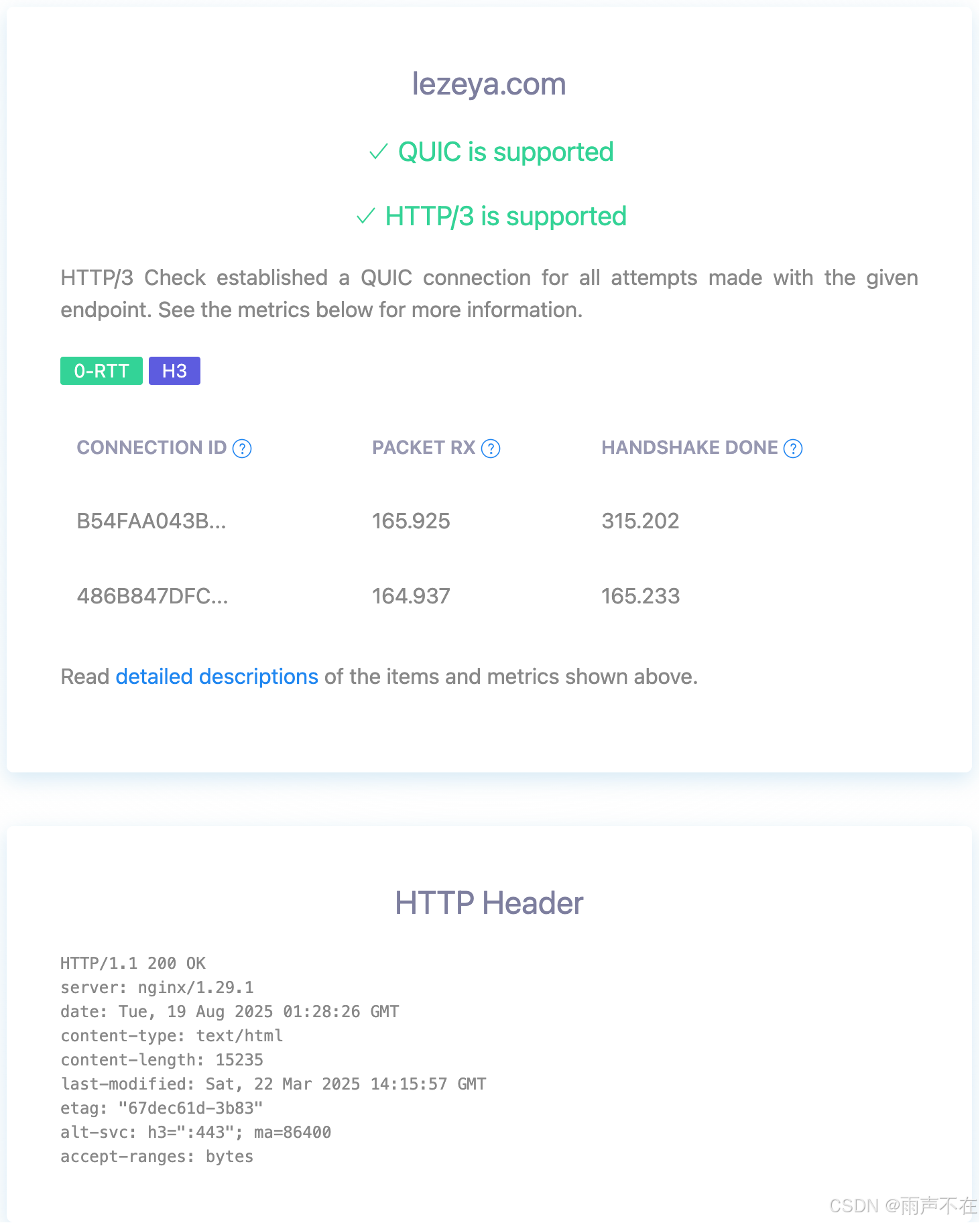
有 HTTP/3 200 说明支持了,HTTP/1.1 200 OK 说明不支持。
浏览器查看quic连接信息
https://netlog-viewer.appspot.com/#quic
使用方法:
- 打开 chrome://net-export/ 点击start over -> start logging to disk
- 另外开一个标签,访问一下http3的页面
- stop logging,获取到一份日志文件
- 打开 https://netlog-viewer.appspot.com/#import 选择导入。
如下,可以看到一些请求的细节信息
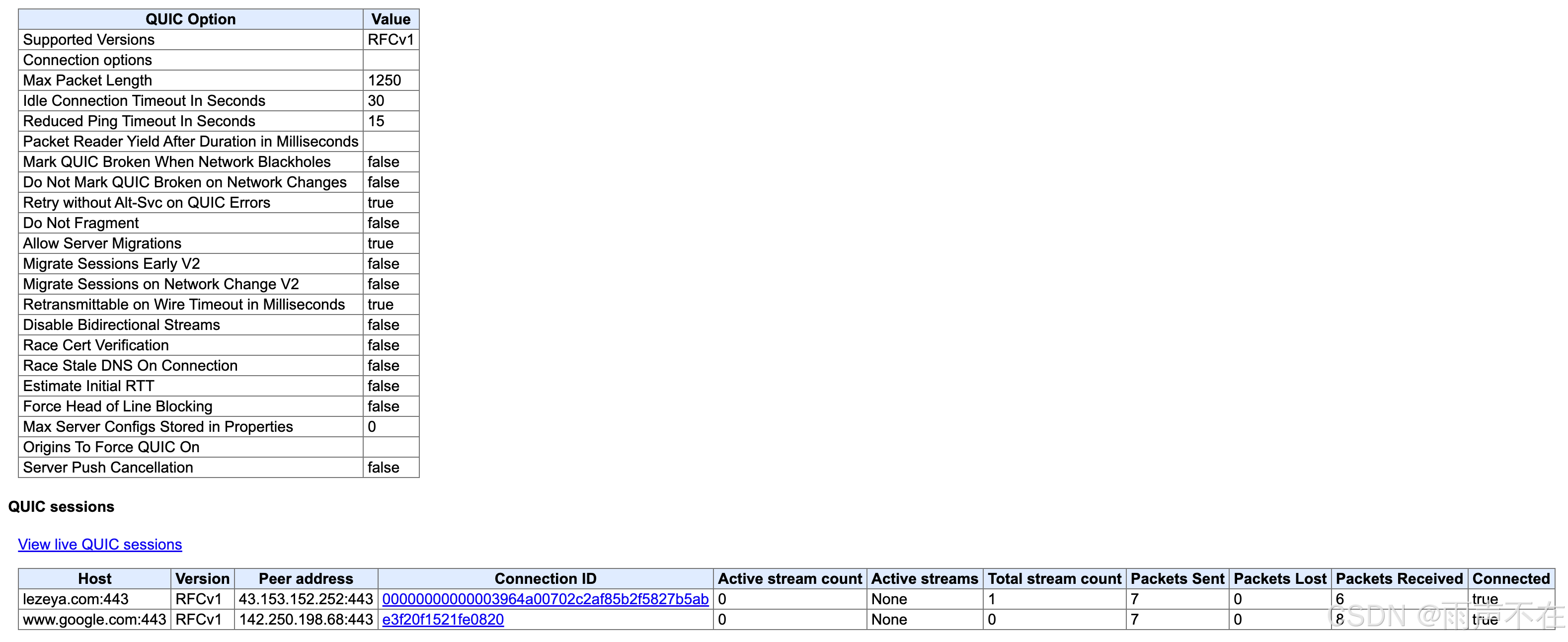
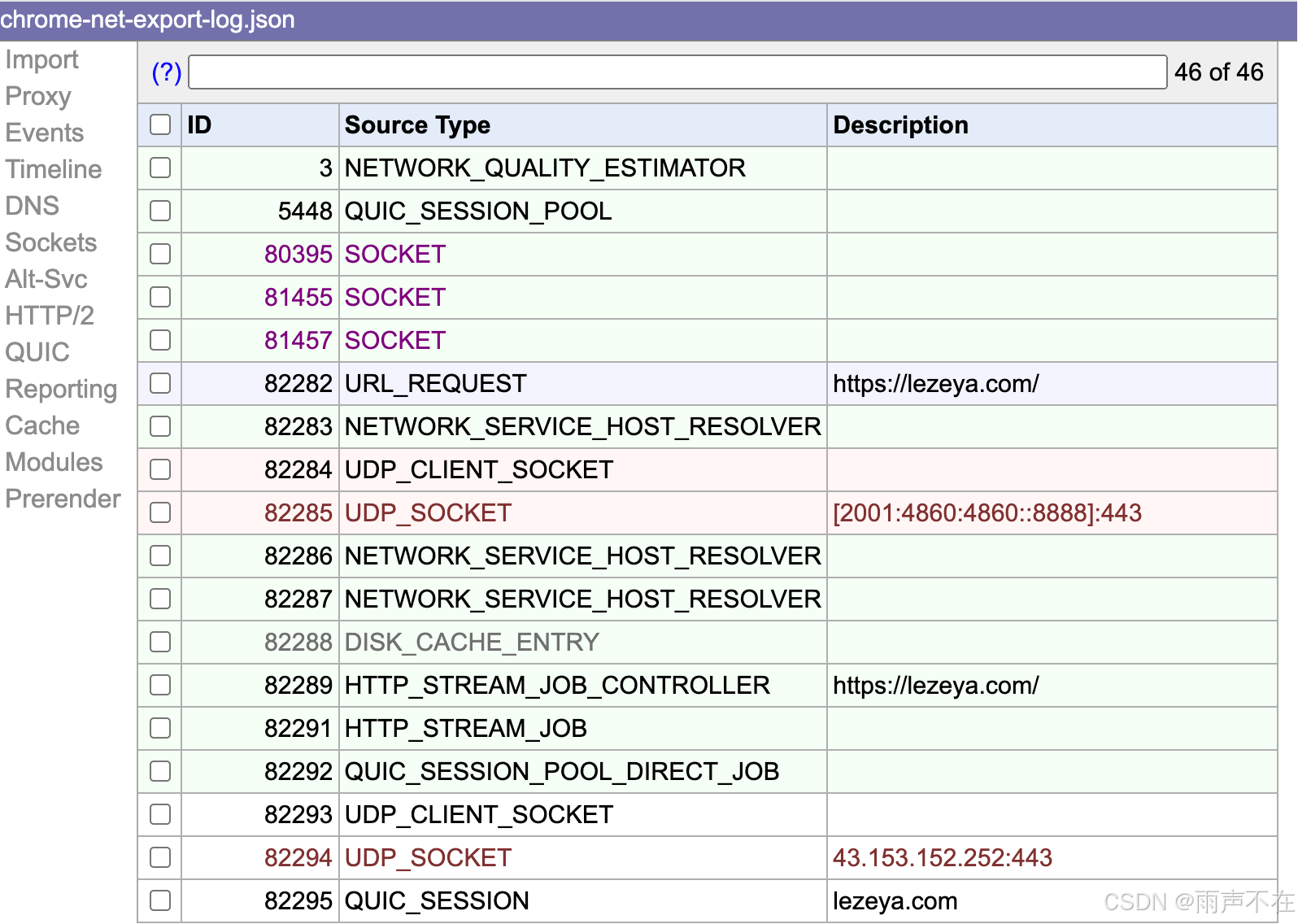
PS: cronet 的日志也可以这样解析查看 :)
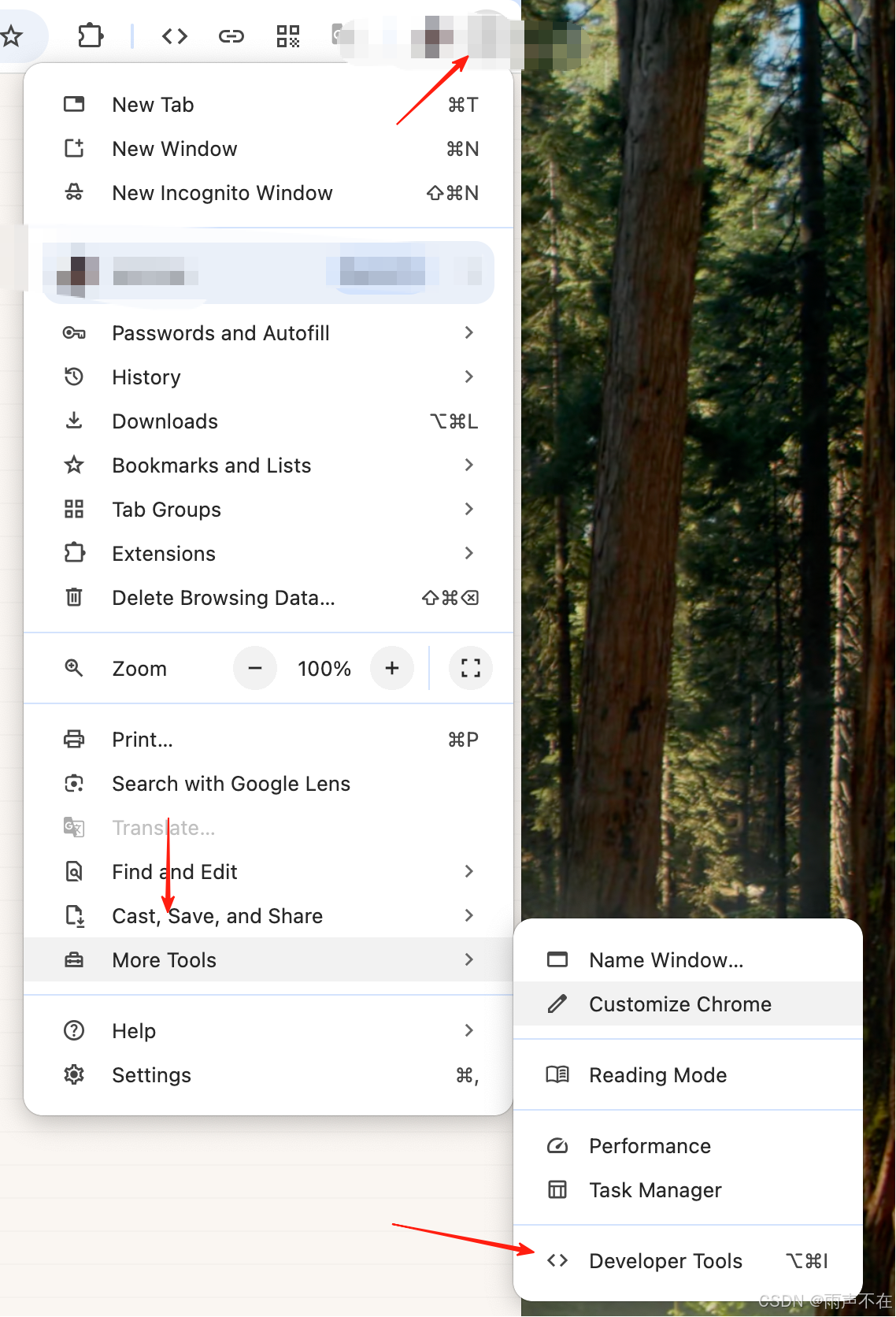
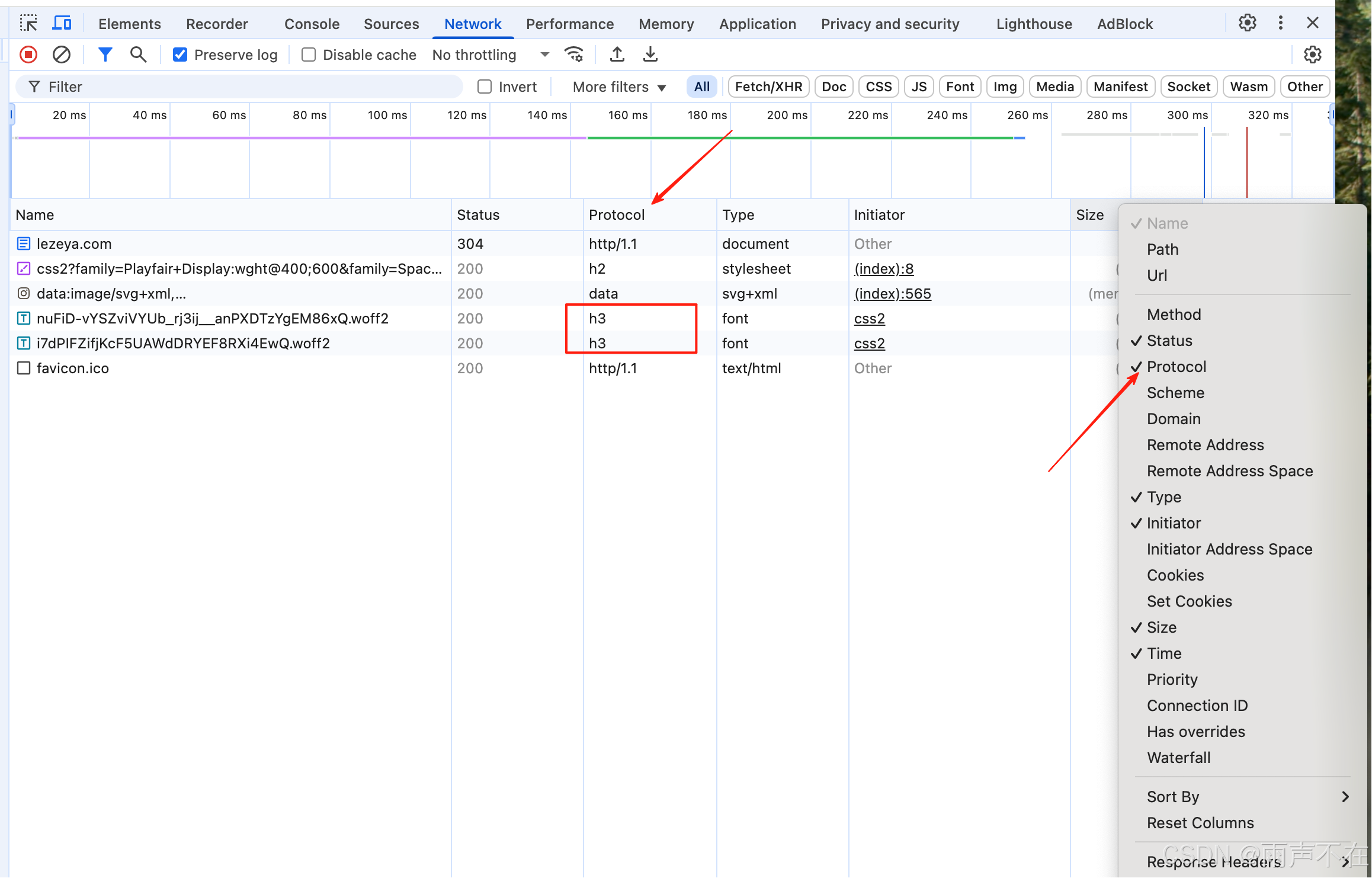
浏览器验证
lezeya.com
More tools -> developer tools -> network -> protocol
如下图操作
网站验证
https://http3check.net/
转自https://blog.csdn.net/yeshennet/article/details/150511128
该文章在 2026/4/2 16:21:30 编辑过





 400 186 1886